From Twitter

Please wait while my tweets load

If you can't wait - jump to Twitter

See more tweets...

RSS Feed

Please wait while my feed loads

See more posts...

Newsletter

Subscribe to either one of our two newsletters for regular updates and information

Downloads newsletter

This is a weekly newsletter with download news, updates and other information

This is a monthly newsletter with software store information, offers and deals

Bullzip PDF Printer 8.2

Quickly create high quality PDF files from almost any Windows application

by Mike Williams

Our Rating:
Your Rating:
Login to rate
Based on 0 ratings
License: Freeware
Operating Systems: Windows 7 (32 bit), Windows 7 (64 bit), Windows 8, Windows Server, Windows Vista (32 bit), Windows Vista (64 bit), Windows XP
Requirements:


Languages: English
Software Cost: Free
Date Updated: 08 March 2012
Watchlist: Add download to my watchlist
Downloads To Date: 611
Developer: Bullzip
RSS News Feed: http://www.bullzip.com/products/pdf/rss.php
Buy TuneUp Utilities 2012 for only £10.95, with lifetime license, saving 63% from the RRP, only from store.downloadcrew.co.uk
Bullzip PDF Printer 8.2
Quickly create high quality PDF files

Bullzip PDF Printer 7.1 creates a virtual printer driver that lets you convert just about any Windows document into an industry-standard PDF file.

To use the program, first open the document that you'd like convert into PDF, then choose the Print option. Select "Bullzip PDF Printer" in the list, click Print, and the conversion dialog will pop up. And if you're happy with the default settings, then all you need to do is provide a name for the file, click Save and your PDF document will be created and displayed.

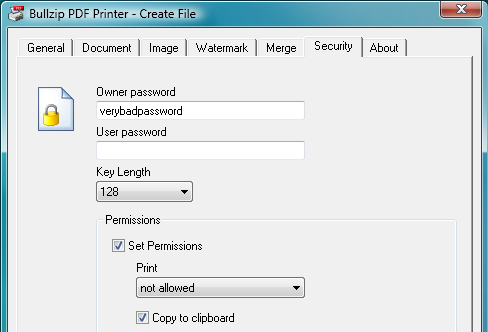
Need more control? Then browse the Bullzip PDF Printer tabs, where you're able to define the document resolution and metadata (author, title, subject and so on), add a watermark, password-protect and encrypt your document, or add it to the end of an existing PDF file.

And while we suspect you'll mostly want to create PDF files, Bullzip PDF Printer can also export your documents to several other formats: BMP, EPS, JPEG, PCX, PNG, PS and TIFF.

Build 8.2 brings these changes:

-Support for Windows 8 Consumer Preview 32 bit (x86).
-Support for Windows 8 Consumer Preview 64 bit (x64).
-Discontinued support for Windows 8 Developer Preview.
-Commercial version without Ghostscript dependency available on request.
-Internal API functions isolated in PdfInternal interface.
-Improved uninstaller.
-Updated translations.
-Minor tweaks.

Verdict:

A capable PDF creation tool with some useful extras that you won't always find in competing products

Your Comments & Opinion
 
Related Download Articles
 
Adobe Reader for mobile 10.1.2

Adobe Reader 10.1.2

Freeware

Your essential tool for viewing PDF files

PrimoPDF - create your own PDFs for free

PrimoPDF 5.1.0.2

Freeware

Create your own PDF files by converting documents you have created in other programs

doPDF 7.3

doPDF 7.3.381

Freeware

Produce a PDF document from just about any Windows application

Adobe Acrobat X Pro

Adobe Acrobat X Pro

Trial Software

Create industry standard PDF files with a powerful set of tools

Other Download Articles From This Category
iolo System Checkup 3.0

iolo System Checkup 3.3.2.9

Function Limited Demo

Scan your PC for potential problems, then either resolve yourself or pay for the fix 

Calendarscope 5.6

Calendarscope 5.6

Trial Software

Keep your life in order with this capable scheduling tool

jv16 PowerTools 2011

jv16 PowerTools 2011 v2.1.0

Trial Software

Clean, optimise and maintain your PC

SUMo

SUMo 3.1.0.154

Freeware

Quickly discover which of your favourite programs have updates available

From Softwarecrew

Please wait while my feed loads

See more posts...

Our Price: $887.93
RRP: $1109.90
Saving 20%
Buy Now More Info
 

Spotlight: Free Full Software

Giveaway: WinISO Standard 6.1.0

Free Full Commercial Software

WinISO is a very comprehensive tool which provides everything you need to create, edit and convert disc images.

If you've an image file already, for instance (ISO, CUE/ BIN, NRG, MDF, CCD, IMG and DVD formats are supported) then you can open it in a click or two, browse the image contents, and extract the files you need with a quick drag and drop.

It's just as easy to create new ISO9660, UDF, even HFS+ images. Just choose the option you need, then either manually build up your preferred file and folder structure; drag and drop your files and folders from Explorer onto the program; or create an image directly from a CD, DVD or Blu-ray disc.

Of course you can edit images, too. Is an ISO file too large for your needs, say? Open it up, locate and remove any surplus files to free up a little space.

WinISO program has full support for reading and creating bootable image files. A simple conversion tool makes it easy to convert disc images into the format you need. And the program can even mount ISO files as Explorer files, or burn images to disc when you're ready to save them.

Please note, this trial version of WinISO Standard will not save files greater than 500MB in size.

Giveaway: on Wednesday, we're giving you the full current version of WinISO Standard 6 worth $29.95. The download link here will take you to Downloadcrew Giveaway.

[...]
Time Remaining: