


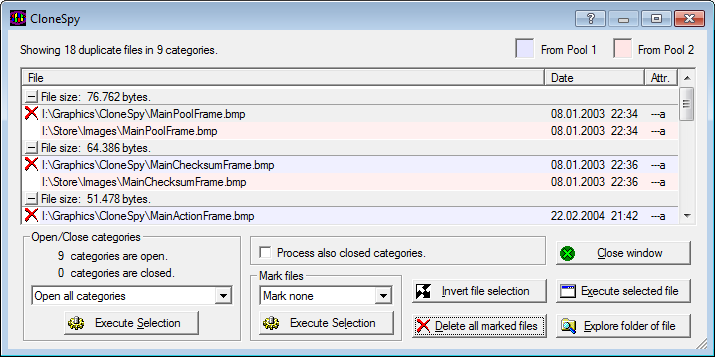
CloneSpy is a fast and capable tool which can help you to find and remove duplicate files.
And while that's probably the program's most common application, it can also look for files which aren't quite identical. You can have it search for files which are the same name, say, or the same name and a similar size, or even just zero length files, whatever they happen to be named.
This is perhaps a little trickier than it should be, thanks to CloneSpy's less than intuitive interface. The program displays two "pools" where you can add folders, for instance; it can run in "Pool 1 only", "Pool 2 only" or "Both pools" mode; and you can make or add CSC (checksum) files. What does all this mean? We didn't know at first, either, so expect to spend a while browsing the Help file (itself fairly complex) before you properly understand what's going on.
Other elements of CloneSpy are fairly straightforward, though. You can have the program automatically delete duplicates according to your preferred rule (older, newer, small, larger, longer name, shorter name, more) just by selecting it from a list, for instance.
And in our tests the program seemed to find duplicate files extremely quickly, maybe faster than anything else we've used.
But please note, as ever with this kind of tool, treat it with extreme caution: used carelessly it can trash your system to the point that Windows won't start again. Don't use CloneSpy unless you fully understand what you're doing, and you've a full and recent backup to hand.
Version 3.41 brings (Changelog):
Added: Files and folders that are ignored during scanning can now be logged (see Logging page of the Options window).
Added: A new option remembers size and position of the Add folder window (see Priority page of the Options window).
Added: The new command line option -s allows for silent scans (see the help file for details).
Added: A message box now explains the Delete all (!) option on the Time + Size page of the Options window when that option is selected.
Modified: Removed the entry Programme from the default folder ignore list (see Folders page of the Options window).
Fixed: Hitting the space bar while a scan is ongoing no longer closes the scan progress window.
Fixed: The context help now works for the edit box in the Insert mask window.
Fixed: Corrected typo (spacing) in the Mode drop-down box of the Main window.
Verdict:
CloneSpy is a powerful and extremely fast duplicate file finder. It's also a little complicated to use, so be careful - delete something important and you could easily trash your PC.
Your Comments & Opinion
Quickly find duplicate images on your PC
Easily find duplicate and similar files or images with this straightforward tool
Safely remove duplicate files from your hard drive quickly and easily
Keep your music collection in good shape with this audio analysis tool
Find and remove duplicate images on your PCs hard drive
Optimise, clean and repair your PC
Completely remove unwanted software from your computer
Bring the classic Start menu back to Windows 11 and Windows 10
Are your drivers up-to-date? Here's how to find out
A free tune-up utility to maintain the performance of Windows
Recover valuable hard drive space by locating and deleting redundant and temporary files