From Twitter

Please wait while my tweets load

If you can't wait - jump to Twitter

See more tweets...

RSS Feed

Please wait while my feed loads

See more posts...

Newsletter

Subscribe to either one of our two newsletters for regular updates and information

Downloads newsletter

This is a weekly newsletter with download news, updates and other information

This is a monthly newsletter with software store information, offers and deals

FreeVimager 4.50

A free, surprisingly powerful image viewer

by Mike Williams

Our Rating:
Your Rating:
Login to rate
Based on 0 ratings
License: Open Source
Operating Systems: Windows 2000, Windows 7 (32 bit), Windows 7 (64 bit), Windows 8, Windows Server, Windows Vista (32 bit), Windows Vista (64 bit), Windows XP
Requirements:
Languages: English
Software Cost: Free
Date Updated: 16 May 2013
Watchlist: Add download to my watchlist
Downloads To Date: 471
Developer: Contaware
RSS News Feed: http://www.contaware.com/component/option,com_rss/feed,RSS2.0/no_html,1/
Buy TuneUp Utilities 2013 for only £14.99, with lifetime license, saving 50% from the RRP, only from store.downloadcrew.co.uk
FreeVimager 4.50
A free, surprisingly powerful image viewer

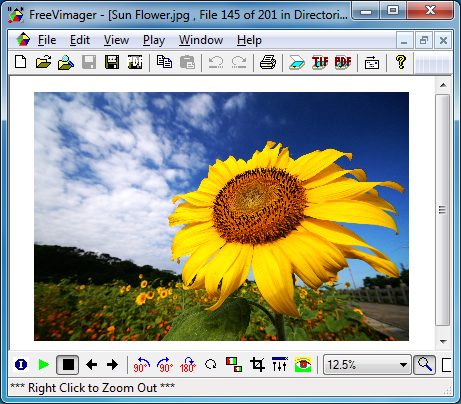
FreeVimager is an open source image viewer which offers far more functionality than you'd expect from this kind of tool.

There's all the basics, of course. The program can associate itself with common image formats, so you can view them with a quick double-click from Explorer. Or you can open a folder of pictures, then browse them in a customisable slideshow. And there are plenty of editing options: rotate, resize, crop, sharpen and soften effects, a red-eye remover, brightness/ contrast/ colour tweaks, and more.

But many of these functions go further than we expected. FreeVimager doesn't just display your images in slideshows, for instance: it can burn them to CD or DVD. The program keeps metadata (EXIF, IPTC, XMP, ICC) during its edits. Many editing options are surprisingly configurable for an image viewer (the Resize option offers 5 resizing methods, for example), and there are some tools which you won't even find in many commercial editors (lossless JPEG cropping, or the ability to add, update or remove an EXIF thumbnail).

And there are more than enough bonus features to justify downloading the program, all on their own. Like its ability to save images as PDF files. The scanning tools (scan multiple pages to a PDF or TIFF file and email them, for instance). And a particularly powerful batch processing dialog can take a folder of images and convert or rename them to suit your needs.

The program is also a little basic in some areas. Image format support is essentials only (bmp, emf, gif, jpg, pcx, png, tiff), and there's no thumbnail browser.

Version 4.5.0 benefits from improved PDF handling, though (files are now smaller and previous viewing problems have been eliminated), while file name sorting now works just as it does in Explorer (1.jpg, 2.jpg .. 10.jpg, 11.jpg, 12.jpg).

On balance, then, FreeVimager is an excellent image viewer, powerful, portable and with something to offer just about everyone. Go grab a copy right now.

Verdict:

Its file format support is limited, but otherwise FreeVimager is an excellent image editor, easy to use and packed with powerful features.

Your Comments & Opinion
 
Related Download Articles
 
ACDSee Free 1.1.21

ACDSee Free 1.1.21

Freeware

A clean, simple and speedy image viewer

FastStone Image Viewer

FastStone Image Viewer 4.8

Free, for personal-use only

View, edit and convert your image collection quickly and easily with this powerful tool

NexusImage 1.1.1

NexusImage 1.1.1

Freeware

An interesting portable image viewer with some unusual extras

Photo Data Explorer 1.02 beta

Photo Data Explorer 1.02 beta

Freeware

A capable digital photo viewer with good display of EXIF metadata

PhotoView 1.4.0.0

PhotoView 1.4.0.0

Freeware

Easily review your photo collection with this portable thumbnail browser

RAW Image Viewer 3.2

RAW Image Viewer 3.2

Freeware

A basic viewer for Canon, Nikon, and Fuji RAW images

Universal Viewer

Universal Viewer 5.7.2

Freeware

Quickly view most file types without waiting for their full application to load

Other Download Articles From This Category
WinSnap’s user interface

WinSnap 4.0.8

Shareware

Capture screenshots quickly and easily with this powerful, but resource-friendly, tool

Camtasia Studio 8.1.0

Camtasia Studio 8.1.0

Trial Software

Capture onscreen activity, edit it into a professional screencast, then share the results

MediaPortal 1.4.0

MediaPortal 1.4.0

Open Source

Record TV, watch DVDs and videos, play music and more with this comprehensive media centre application

Spotify 0.9.1.53

Spotify 0.9.1.53

Freeware

Stream audio tracks from the Internet for free

From Softwarecrew

Please wait while my feed loads

See more posts...

Our Price: $39.99
RRP: $49.99
Saving 20%
Buy Now More Info
 

Spotlight: Free Full Software

Ashampoo Burning Studio 2013 (v11.0.6)

Free Full Commercial Software

Ashampoo Burning Studio 2013 is a compact, simple, but surprisingly feature-packed disc burning suite.

The program makes it easy to create simple data discs and audio CDs, for instance: just drag and drop your files onto the list area and you'll be burning the finished disc in a couple of clicks.

That's just the start, though. Burning Studio 2013 can also create data discs with customised, interactive multi-page menus, perfect if you'd like a more professional way to share and present the disc contents.

A built-in backup tool allows you to create backups which may be encrypted, compressed, and span several CDs, DVDs and Blu-rays.

And there are modules to create VCD or SVCD video projects; burn video DVDs or Blu-ray discs from prepared folders; create, browse or burn disc images (ISO, CUE/ BIN and Ashdisc formats are supported); copy discs, erase them, design and print disc covers, labels and booklets, and more.

The focus throughout is on ease of use, though, and so Ashampoo Burning Studio 2013 remains very straightforward, whatever you're doing. Most disc projects are created via the same simple interface, and for the most part all you have to do is drag and drop the necessary files. But experts will find more advanced options are only a click away, and if you need to then you can set ISO and UDF version, enable Joliet, make a disc bootable and more.

Note the download here will take you to the Downloadcrew Software Store where you can download Burning Studio 2013.

[...]
Value:
Free
Rating: