From Twitter

Please wait while my tweets load

If you can't wait - jump to Twitter

See more tweets...

RSS Feeds

Receive a regular RSS feed from our latest, most popular and recommended downloads

Latest downloads feed

Get a regular RSS from our most latest downloads

Most popular downloads feed

Get a regular RSS from our most popular downloads

Recommended downloads feed

Get a regular RSS from our recommended downloads

Newsletter

Subscribe to either one of our two newsletters for regular updates and information

Downloads newsletter

This is a weekly newsletter with download news, updates and other information

This is a monthly newsletter with software store information, offers and deals

BabyPDF 1.0.0.23

View and edit PDF files with this free tool

by Mark Wilson

Our Rating:
Your Rating:
Login to rate
Based on 0 ratings
License: Freeware
Operating Systems: Windows 7 (32 bit), Windows 7 (64 bit), Windows Vista (32 bit), Windows Vista (64 bit), Windows XP
Requirements:


Languages: English
Software Cost: Free
Date Updated: 19 January 2012
Watchlist: Add download to my watchlist
Downloads To Date: 1215
Developer: FlashJet
RSS News Feed:
Buy TuneUp Utilities 2012 for only £10.95, with lifetime license, saving 63% from the RRP, only from store.downloadcrew.co.uk
BabyPDF
View and edit PDFs for free withBabyPDF

While there are a number of applications that can be used to open PDF files – the vast majority of them being free – but it is a different story when it comes to editing the same types of file. There are certainly tools that can be used to work with PDF files, but they have a tendency to be both expensive and complicated to use. With a strong design-centric theme, most PDF editing programs are not for the average user.

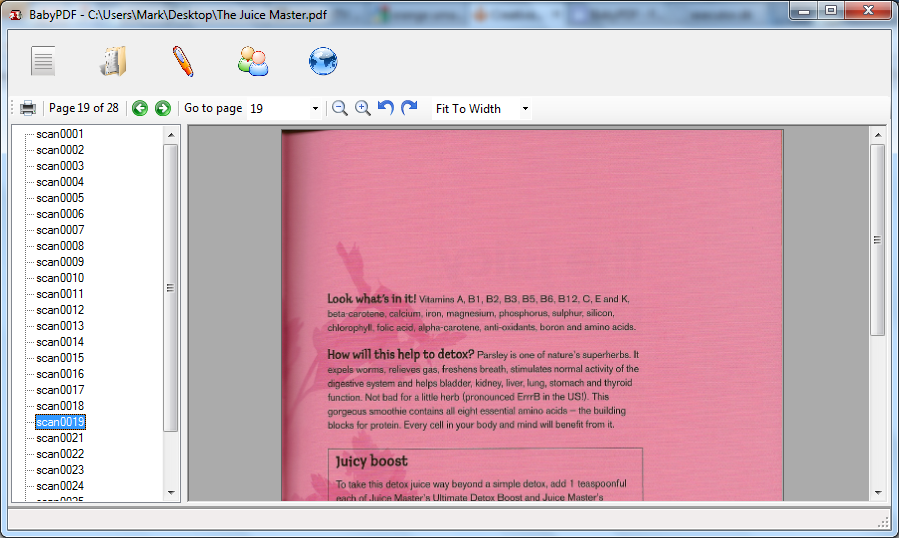
BabyPDF on the other hand is not only available free of charge, but is also instantly accessible and can be used as both a viewer and an editor as required. When used in PDF viewing mode, the program is quick and easy to use, with basic controls enabling you to adjust the appearance of the document you are working with and to easily navigate through pages. You can then switch to editing mode when required to make changes with a variety of tools.

All of this sounds great, but there are a few issues. In most instances you will find that it is not possible to make edits to the original PDF file, although you will be able to make additions by working with new image and text layers. As new elements are added to the page they can be dragged and dropped into position, and you can use Z-ordering to change layer orders.

The layout of the program itself is a little on the unconventional side, but for anyone who has dabbled in DTP will find it fairly familiar. You are afforded a huge level of control over the objects you add to pages, and this gives you a great degree of flexibility. One downside of BabyPDF is that the pages you edit are watermarked, but this is not necessarily a bad thing as it means that anyone viewing the document is made aware that they are not looking at an unadulterated original.

Verdict:

It’s a far cry from the likes of Adobe Acrobat, but bringing PDF editing to the masses for free is still quite impressive.

Your Comments & Opinion
 
Related Download Articles
 
Google Books Downloader

Google Books Downloader 2.0

Freeware

Save Google books as PDF, JPEG or PNG files

My Lockbox

My Lockbox Free Edition 2.8

Freeware

Password-protect and hide private documents on your computer

Kingsoft Writer Free 2012

Kingsoft Writer Free 2012

Freeware

An impressive free word processor that rivals paid-for software

Adobe Acrobat X Pro

Adobe Acrobat X Pro

Trial Software

Create industry standard PDF files with a powerful set of tools

Other Download Articles From This Category
Xara Photo and Graphic Designer MX 8.1

Xara Photo and Graphic Designer MX 8.1

Trial Software

Photo editing, vector drawing, dtp, web graphics, Flash animation - this tool does it all

Xara Designer Pro X 8.1

Xara Designer Pro X 8.1

Trial Software

From photos to illustration, print to web work, Xara Designer Pro X can handle all your creative needs

Adobe Proto

Adobe Proto 1.0

No Trial Available. Purchase Only

Create interactive design prototypes with your iPad

Adobe Illustrator CS6

Adobe Illustrator CS6

Trial Software

Adobe's flagship vector drawing application gains a new look and much-enhanced performance

From Softwarecrew

Please wait while my feed loads

See more posts...

Our Price: $887.93
RRP: $1109.90
Saving 20%
Buy Now More Info
 

Spotlight: Free Full Software

Giveaway: WinISO Standard 6.1.0

Free Full Commercial Software

WinISO is a very comprehensive tool which provides everything you need to create, edit and convert disc images.

If you've an image file already, for instance (ISO, CUE/ BIN, NRG, MDF, CCD, IMG and DVD formats are supported) then you can open it in a click or two, browse the image contents, and extract the files you need with a quick drag and drop.

It's just as easy to create new ISO9660, UDF, even HFS+ images. Just choose the option you need, then either manually build up your preferred file and folder structure; drag and drop your files and folders from Explorer onto the program; or create an image directly from a CD, DVD or Blu-ray disc.

Of course you can edit images, too. Is an ISO file too large for your needs, say? Open it up, locate and remove any surplus files to free up a little space.

WinISO program has full support for reading and creating bootable image files. A simple conversion tool makes it easy to convert disc images into the format you need. And the program can even mount ISO files as Explorer files, or burn images to disc when you're ready to save them.

Please note, this trial version of WinISO Standard will not save files greater than 500MB in size.

Giveaway: on Wednesday, we're giving you the full current version of WinISO Standard 6 worth $29.95. The download link here will take you to Downloadcrew Giveaway.

[...]
Time Remaining: