From Twitter

Please wait while my tweets load

If you can't wait - jump to Twitter

See more tweets...

RSS Feed

Please wait while my feed loads

See more posts...

Newsletter

Subscribe to either one of our two newsletters for regular updates and information

Downloads newsletter

This is a weekly newsletter with download news, updates and other information

This is a monthly newsletter with software store information, offers and deals

CubicExplorer 0.95.1

A powerful, portable alternative to Windows Explorer

by Mike Williams

Our Rating:
Your Rating:
Login to rate
Based on 1 ratings
License: Open Source
Operating Systems: Windows 7 (32 bit), Windows 7 (64 bit), Windows Vista (32 bit), Windows Vista (64 bit), Windows XP
Requirements:


Languages: English, Arabic, Chinese (Simplified), Chinese (Traditional), Czech, Dutch, Finnish, French, German, Greek, Hebrew, Hungarian, Italian, Japanese, Korean, Norwegian, Polish, Portuguese (Brazil), Portuguese (Portugal), Russian, Spanish, Slovak, Swedish, Turkish, Ukranian, Valencian
Software Cost: Free
Date Updated: 14 March 2012
Watchlist: Add download to my watchlist
Downloads To Date: 140
Developer: Marko Savolainen
RSS News Feed: http://code.google.com/feeds/p/cubicexplorer/svnchanges/basic
Buy TuneUp Utilities 2012 for only £10.95, with lifetime license, saving 63% from the RRP, only from store.downloadcrew.co.uk
CubicExplorer 0.95
A powerful, portable alternative to Windows Explorer

CubicExplorer is a free, open-source file manager which aims to offer a partial replacement to Windows Explorer.

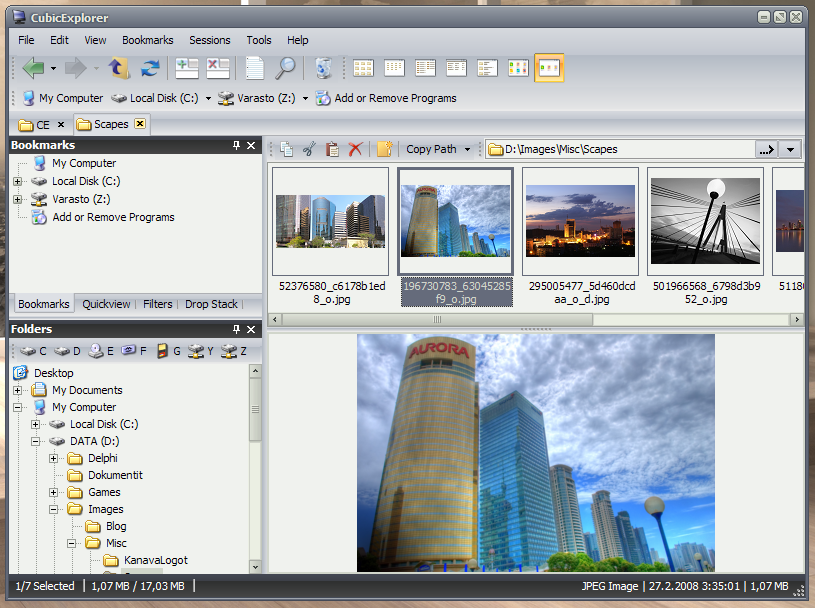
At first glance the program looks very similar to Explorer, so you'll feel at home right away. But take a closer look and some useful additional features will become obvious. For example, as with many similar tools, CubicExplorer offers tabbed browsing of your file system. Click File > Add Tab to add as many new tabs as you need, point these to commonly-used folders and they'll now only be a click away.

You also get filters, a convenient way to view only the file types you need. Click a Pictures folder on our test system and the Filters pane told us there were 189 JPGs, 4 PNG files, and 1 each of BMP, GIF and TXT files. If for some reason we wanted to view only the PNG files then checking that box would be enough to make it happen; or alternatively we could enter a simple text string and CubicExplorer should display any files with a name containing those characters.

And browsing the menus reveals plenty of interesting extras. There are no less than 5 ways to copy a file or folder path to the clipboard, for instance; there's an option to create symbolic links for files; and the program provides support for themes, transparency, and many different configuration settings, all of which can be saved as a working session for easy reuse later.

The program doesn't always work quite as you expect. If you type a text filter like steve*.jpg, for instance, you might expect to immediately see only JPG images beginning with the word "steve", but actually nothing is filtered at all: you need to click a "Strict filtering" box to turn this on. There are similar issues with defaults elsewhere and so you might have to spend a while exploring the various buttons and settings before you properly understand what CubicExplorer can do.

It's still a useful program, though, and very unobtrusive. This is the portable build of CubicExplorer, so it doesn't require installation, won't write to your Registry or interfere with your existing Explorer setup; just unzip it into a folder somewhere and use it whenever Windows Explorer just isn't up to the job.

Build 0.95.1 brings these changes:

-Fixed Allow Move button in Stack toolbar.
-Check selection now changes focus.
-Fixed status bar not updating on tab change bug.
-Chanced Update type Weekly to Snapshot.
-Updated Chinese Simplified translation (thanks to lcz20).

Verdict:

CubicExplorer has a few quirks, but these are outweighed by a raft of time-saving file management features. If you're tired of Windows Explorer then give this a try instead.

Your Comments & Opinion
 
Related Download Articles
 
BExplorer (Better Explorer)

BExplorer (Better Explorer) 2.0.0.731

Freeware

An Explorer replacement that benefits from tabs and more

Explorer++ Portable

Explorer++ Portable v1.3.2 (32-bit)

Freeware

A replacement for Windows Explorer with a powerful tabbed interface

Explorer++ Portable

Explorer++ Portable v1.3.2 (64-bit)

Freeware

A replacement for Windows Explorer with a powerful tabbed interface

SpeedCommander (64-bit)

SpeedCommander 14.20 (64-bit)

Trial Software

A powerful dual-pane file manager with strong archive, FTP and macro support

SpeedCommander (32-bit)

SpeedCommander 14.20 [32-bit]

Trial Software

Powerful dual-pane file manager with strong archive, FTP and macro support

Total Commander 8

Total Commander 8.0b1 (32-bit)

Trial Software

Feature-packed Windows Explorer replacement that enables you do more with your files

Total Commander 8

Total Commander 8.0b1 (64-bit)

Trial Software

Feature-packed Windows Explorer replacement that enables you do more with your files

xplorer2 professional (32-bit)

xplorer2 2.1.0.2 (32-bit)

Trial Software

Simplify all your file management tasks with this powerful Explorer replacement

xplorer2 professional (64-bit)

xplorer2 2.1.0.2 (64-bit)

Trial Software

Simplify all your file management tasks with this powerful Explorer replacement

xplorer2 lite

xplorer2 Lite v2.0.0.3

No Trial Available. Purchase Only

Simplify all your file management tasks with this powerful Explorer replacement

Other Download Articles From This Category
iolo System Checkup 3.0

iolo System Checkup 3.3.2.9

Function Limited Demo

Scan your PC for potential problems, then either resolve yourself or pay for the fix 

Calendarscope 5.6

Calendarscope 5.6

Trial Software

Keep your life in order with this capable scheduling tool

jv16 PowerTools 2011

jv16 PowerTools 2011 v2.1.0

Trial Software

Clean, optimise and maintain your PC

SUMo

SUMo 3.1.0.154

Freeware

Quickly discover which of your favourite programs have updates available

From Softwarecrew

Please wait while my feed loads

See more posts...

Our Price: $99.95
RRP: $129.95
Saving 23%
Buy Now More Info
Offer Ends In:
 

Spotlight: Free Full Software

Giveaway: WinISO Standard 6.1.0

Free Full Commercial Software

WinISO is a very comprehensive tool which provides everything you need to create, edit and convert disc images.

If you've an image file already, for instance (ISO, CUE/ BIN, NRG, MDF, CCD, IMG and DVD formats are supported) then you can open it in a click or two, browse the image contents, and extract the files you need with a quick drag and drop.

It's just as easy to create new ISO9660, UDF, even HFS+ images. Just choose the option you need, then either manually build up your preferred file and folder structure; drag and drop your files and folders from Explorer onto the program; or create an image directly from a CD, DVD or Blu-ray disc.

Of course you can edit images, too. Is an ISO file too large for your needs, say? Open it up, locate and remove any surplus files to free up a little space.

WinISO program has full support for reading and creating bootable image files. A simple conversion tool makes it easy to convert disc images into the format you need. And the program can even mount ISO files as Explorer files, or burn images to disc when you're ready to save them.

Please note, this trial version of WinISO Standard will not save files greater than 500MB in size.

Giveaway: on Wednesday, we're giving you the full current version of WinISO Standard 6 worth $29.95. The download link here will take you to Downloadcrew Giveaway.

[...]
Time Remaining: