From Twitter

Please wait while my tweets load

If you can't wait - jump to Twitter

See more tweets...

RSS Feed

Please wait while my feed loads

See more posts...

Newsletter

Subscribe to either one of our two newsletters for regular updates and information

Downloads newsletter

This is a weekly newsletter with download news, updates and other information

This is a monthly newsletter with software store information, offers and deals

Multi Commander 1.2.1 (64-bit)

Take control of your file and folder management with this powerful – if slightly unrefined - utility 

by Nick Peers

Our Rating:
Your Rating:
Login to rate
Based on 0 ratings
License: Freeware
Operating Systems: Windows 2000, Windows 7 (32 bit), Windows Server, Windows Vista (32 bit), Windows XP
Requirements:


Languages: English
Software Cost: Free
Date Updated: 26 January 2012
Watchlist: Add download to my watchlist
Downloads To Date: 657
Developer: Mathias Svensson
RSS News Feed: http://multicommander.blogspot.com/feeds/posts/default
Multi Commander
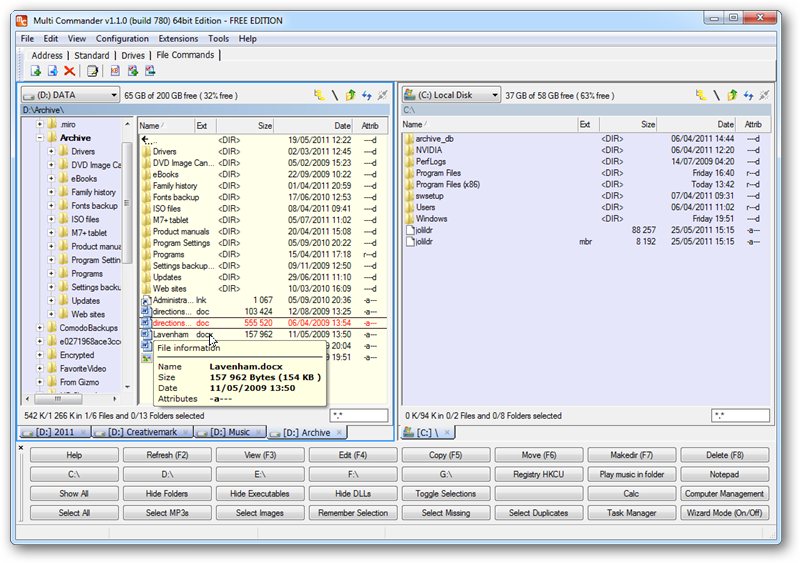
The slightly overwhelming interface demonstrates the raw power and features on offer from Multi Commander.

Navigating files and folders in Windows has – it’s true – become easier with each successive release, but there’s still one major problem that’s never been addressed by Microsoft: the single folder view. Despite the existence of the Favorites Bar, copying or moving files from one folder to another usually involves opening two separate folder windows.

You then manually have to manually browse to the source and destination folder before you can drag files between them.
File explorer tools are ten-a-penny, with the most notable improvement being that you can view two or even four folders at once in single window, making copying and navigating a quick and easy affair. Multi Commander only offers a choice of single or dual panes for viewing folders, but you can open multiple tabs in each window, allowing you to create shortcuts to favourite folders that you can easily switch between for file management purposes.

A large number of buttons – all customisable - sit underneath the two panes giving you access to shortcuts, selection tools (such as images or MP3 files), system tools and various folder-based tweaks, like being able to hide DLLs from view. It also comes with built-in capabilities for accessing the Registry, viewing remote folders via FTP and opening a range of compressed archives, including 7zip, RAR and TAR in addition to Zip.

There are some useful tools thrown in for good measure: manage file and folder permissions, forcibly end stubborn processes, pack and unpack archives and create symbolic links and junctions in addition to regular shortcuts. There are also basic media management tools and a built-in file viewer for peeking at the code behind a file, all adding up to a tool that is well on its way to becoming your one-stop shop for all matters file-related.

The program interface is fully customisable, but a little drab and overwhelming for our liking in its default state – however, there’s little doubting its raw power and potential, and the fact it’s now free makes it a tool well worth checking out, although the author has warned it may revert to a paid-for license in the future. 

Verdict:

A decent stab at providing a comprehensive file-management tool, packed with useful features and infinitely more attractive now it’s completely free. 

Your Comments & Opinion
 
Related Download Articles
 
Multi Commander

Multi Commander 1.2.1 (32-bit)

Freeware

Take control of your file and folder management with this powerful – if slightly unrefined - utility 

KO Approach

KO Approach 0.5 (32-bit)

Trial Software

Enhance Windows Explorer with this speedy file navigation system

Windows 7 Folder Background Changer 1.1

Windows 7 Folder Background Changer 1.1

Freeware

Set a custom background image for almost any Explorer folder

CubicExplorer 0.90

CubicExplorer 0.90

Freeware

A power replacement for Explorer which makes it easy to navigate and manage files

Other Download Articles From This Category
Start Orb Mover 1.0

Start Orb Mover 1.0

Freeware

Move your Windows 7 Start button with this free portable app 

SystemRescueCD

SystemRescueCD 2.5.0

Open Source

Powerful self-booting administrator's toolkit that fits in your pocket.

Lion Tweaks 1.4

Lion Tweaks 1.4.1

Freeware

Some of the new Lion improvements can be distracting, use this tweaking tool to switch them off

Windows 8 Start Screen Full 3.0 For XP, Vista and 7

Windows 8 Start Screen Full 3.0

Freeware

Get the look of Widows 8 whether you are using XP, Vista or Windows 7

From Softwarecrew

Please wait while my feed loads

See more posts...


Spotlight: Free Full Software

GIVEAWAY: IObit Advanced SystemCare PRO 5

Free Full Commercial Software

Advanced SystemCare 5 is IObit's latest "do everything" PC security, maintenance and optimisation suite.

The program divides its functions into four main sections. And the first, Quick Care, deals with rapid checks which you might want to run daily. A "Quick Malware Removal" scan checks for and removes any infections; the Privacy Sweep wipes various internet and activity histories; and there are tools to clean your Registry, delete junk files, and fix invalid shortcuts.

The second section, Deep Care, provides more thorough versions of the previous features, and introduces some new functions of its own. So there are tools to defrag your Registry and hard drive, optimise your PC boot time, detect and fix hard drive errors, spot missing Windows updates, and more.

The third section is the Toolbox, which includes more than 20 utilities with even more PC maintenance power. The IObit Uninstaller helps you properly remove applications, for instance; the File Shredder securely wipes confidential files so they can't be recovered; and there are tools to optimise your RAM and Internet connection, detect and fix common Windows problems, find duplicate files, remove deeply embedded malware infections, back up and update your drivers, and more.

And the fourth section, Turbo Boost, can temporarily turn off non-essential services and applications, delivering an extra performance boost when you need it most.

The major addition in this version is Active Boost, which optimises your application's RAM and CPU use in real time. Quick and Deep Care are also enhanced; Turbo Boost can recover more system resources than ever; the interface has been changed just a little, making the program easier to use, and new cloud technology allows Advanced SystemCare to respond more quickly to new malware outbreaks.

GIVEAWAY: we're giving you the full current version of IObit Advanced System Care PRO 5, worth $19.95, through the Downloadcrew Giveaway website, starting midnight Tuesday 21 February through to 23:59 Wednesday 22 February, Central European Time. During this period, everyone and anyone can download and get a serial code. The download link here will take you to the Downloadcrew Giveaway website!

[...]
Time Remaining: