From Twitter

Please wait while my tweets load

If you can't wait - jump to Twitter

See more tweets...

RSS Feed

Please wait while my feed loads

See more posts...

Newsletter

Subscribe to either one of our two newsletters for regular updates and information

Downloads newsletter

This is a weekly newsletter with download news, updates and other information

This is a monthly newsletter with software store information, offers and deals

KO Approach 0.5 (32-bit)

Enhance Windows Explorer with this speedy file navigation system

by Mark Wilson

Our Rating:
Your Rating:
Login to rate
Based on 0 ratings
License: Trial Software
Operating Systems: Windows 7 (32 bit), Windows Vista (32 bit), Windows XP
Requirements:


Languages: English
Software Cost: $5.95 (Windows)
Date Updated: 20 May 2011
Watchlist: Add download to my watchlist
Downloads To Date: 34
Developer: KO Software
RSS News Feed: http://www.ko-sw.com/Blog/Default.aspx
Buy TuneUp Utilities 2012 for only £10.95, with lifetime license, saving 63% from the RRP, only from store.downloadcrew.co.uk
KO Approach
Extend the capabilities of Windows Explorer with KO Approach

For many people, Windows Explorer is all that they know and they become used to the various quirks that can sometimes make it annoying to use. Other people give up on the program entirely and seek out alternatives. But there is a third way, and this is something that is provided by KO Approach, and add-on for Explorer that can help to greatly speed up navigation.

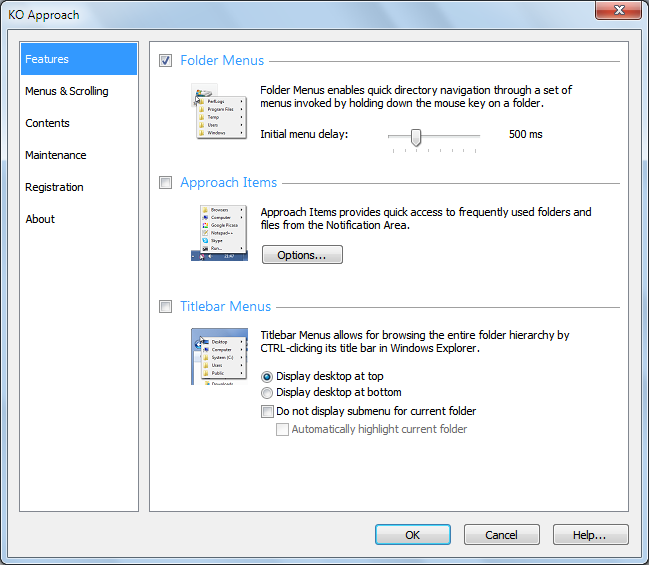
The application makes it possible to access your folders from almost anywhere thanks to a highly customisable menu system. This works in much the same way as the familiar context menu that appears when right clicking, but in this case it is activated with a long left click. You can then use the menu that is displayed to navigate through the contents of your hard drive without the need to launch Explorer.

Another option is to activate 'approach' feature which enables you to access the same menu from the KO Approach notification area icon. The final option is to make use of titlebar menus. As you might deduce, this type of menu can be accessed from the titlebar of any program - all you need to do is hold down Ctrl while left clicking.

The different methods of browsing through your folders can be used in different ways. For example, you can use the notification area icons to access your most frequently used folders, while the other two menus can be used to browse through the entire contents of your drives. It is also possible to add extra shortcuts to programs and web sites to make the utility even more useful.

An important feature of KO Approach is it support for plugins. There are a number of free plugins available and these enable you to extend the capabilities of the program in a number of ways such as adding file previewing and copying information to the clipboard.

Verdict:

An interesting alternative to Explorer alternatives - KO Approach sits happily alongside Windows' build in file browser and compliments it superbly.

Your Comments & Opinion
 
Related Download Articles
 
Add-on Compatibility Reporter

Firefox Add-on Compatibility Reporter 1.0.3

Freeware

Let developers and Mozilla know about problems with add-ons

KO Approach

KO Approach 0.5 (64-bit)

Trial Software

Enhance Windows Explorer with this speedy file navigation system

Tabbles

Tabbles 2.0

Freeware

Keep your files organised without the need to resort to using folders

Directory Lister Pro

Directory Lister Pro 1.34

Trial Software

Print folder listings from Explorer using this simple yet effective tool

Other Download Articles From This Category
iolo System Checkup 3.0

iolo System Checkup 3.3.2.9

Function Limited Demo

Scan your PC for potential problems, then either resolve yourself or pay for the fix 

Calendarscope 5.6

Calendarscope 5.6

Trial Software

Keep your life in order with this capable scheduling tool

jv16 PowerTools 2011

jv16 PowerTools 2011 v2.1.0

Trial Software

Clean, optimise and maintain your PC

SUMo

SUMo 3.1.0.154

Freeware

Quickly discover which of your favourite programs have updates available

From Softwarecrew

Please wait while my feed loads

See more posts...


Spotlight: Free Full Software

Giveaway: WinISO Standard 6.1.0

Free Full Commercial Software

WinISO is a very comprehensive tool which provides everything you need to create, edit and convert disc images.

If you've an image file already, for instance (ISO, CUE/ BIN, NRG, MDF, CCD, IMG and DVD formats are supported) then you can open it in a click or two, browse the image contents, and extract the files you need with a quick drag and drop.

It's just as easy to create new ISO9660, UDF, even HFS+ images. Just choose the option you need, then either manually build up your preferred file and folder structure; drag and drop your files and folders from Explorer onto the program; or create an image directly from a CD, DVD or Blu-ray disc.

Of course you can edit images, too. Is an ISO file too large for your needs, say? Open it up, locate and remove any surplus files to free up a little space.

WinISO program has full support for reading and creating bootable image files. A simple conversion tool makes it easy to convert disc images into the format you need. And the program can even mount ISO files as Explorer files, or burn images to disc when you're ready to save them.

Please note, this trial version of WinISO Standard will not save files greater than 500MB in size.

Giveaway: on Wednesday, we're giving you the full current version of WinISO Standard 6 worth $29.95. The download link here will take you to Downloadcrew Giveaway.

[...]
Time Remaining: