From Twitter

Please wait while my tweets load

If you can't wait - jump to Twitter

See more tweets...

RSS Feed

Please wait while my feed loads

See more posts...

Newsletter

Subscribe to either one of our two newsletters for regular updates and information

Downloads newsletter

This is a weekly newsletter with download news, updates and other information

This is a monthly newsletter with software store information, offers and deals

MAGIX Website Maker MX

Create attractive and feature-packed Flash websites in minutes

by Mike Williams

Our Rating:
Your Rating:
Login to rate
Based on 1 ratings
License: Trial Software
Operating Systems: Mac OS X, Windows 7 (32 bit), Windows 7 (64 bit), Windows Vista (32 bit), Windows Vista (64 bit), Windows XP
Requirements:


Languages: English, Dutch, French, German, Italian, Spanish, Turkish
Software Cost: $34.00 (Windows) $34.00 (Mac)
Date Updated: 25 January 2012
Watchlist: Add download to my watchlist
Downloads To Date: 3270
Developer: MAGIX
RSS News Feed: http://feeds2.feedburner.com/MagixPhotoWidgets
Twitter Feed: http://twitter.com/Magix_NA
Buy TuneUp Utilities 2012 for only £10.95, with lifetime license, saving 63% from the RRP, only from store.downloadcrew.co.uk
MAGIX Website Maker MX
Create attractive and feature-packed Flash websites in minutes

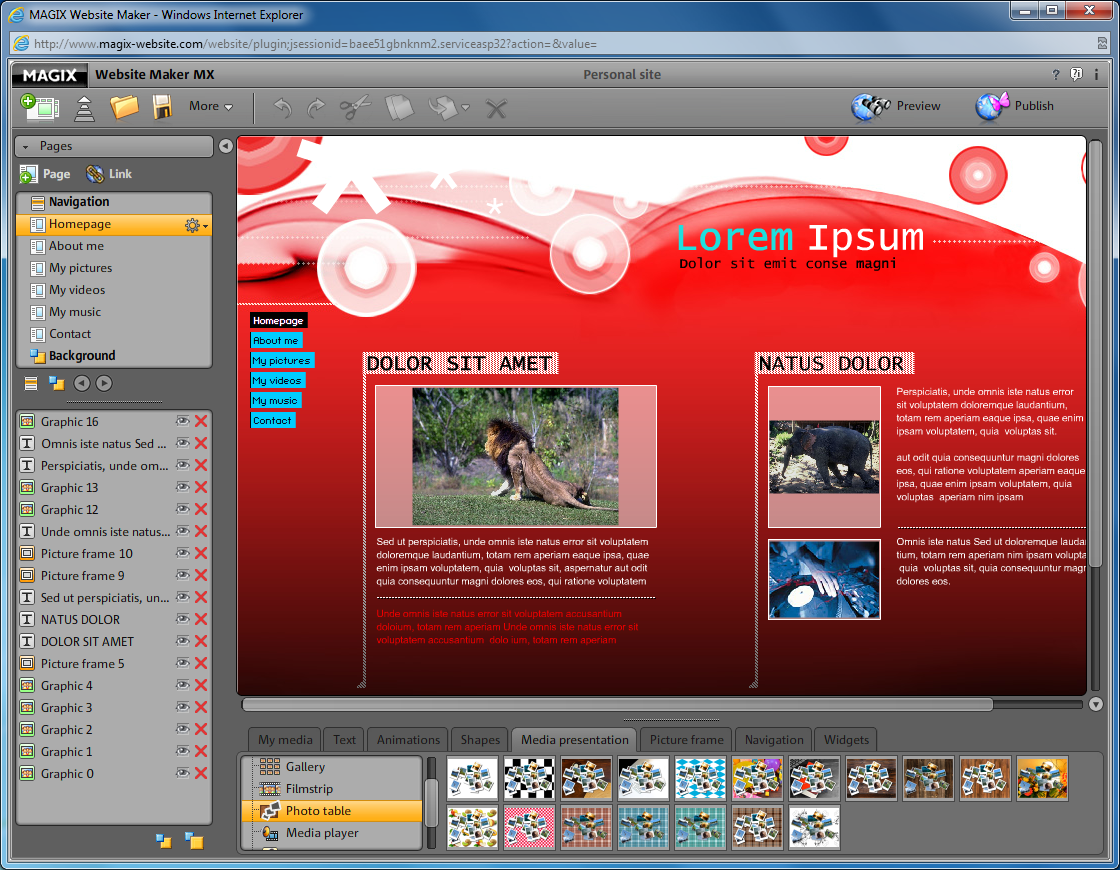
MAGIX Website Maker MX is an easy-to-use tool for creating stylish Flash-based websites, even if you've no previous web design experience.

While you must download and install a local component to use Website Maker, it actually runs in your web browser (IE, Firefox, Opera and Chrome are supported). The site creation process works much like any other tool, though. So you browse a lengthy list of attractive site templates, each of which comes with multiple pages and built-in navigation, and choose one you like. Then you replace the default text, images, music or videos with your own content. And finally you publish the site and share it with the world.

This generally works quite well, as there are lots of customisations available. Would you like to create a thumbnail photo gallery, for instance? Website Maker comes with ten different gallery styles - but that's just the start. You can also present your images in animated filmstrips, or choose from one of 18 "photo tables", where your thumbnails are scattered attractively across a variety of backgrounds. Just find an option you like and it's ready to use in a couple of clicks.

There's even more configurability elsewhere. If you'd like a Flash media player on your site, for instance, there are more than 80 options available. And your site can easily be customised with many other components: music players, contact forms, guestbooks, visitor counters, embedded Google maps, YouTube videos and more.

This new version of Website Maker extends the franchise with even more web design power. The Image Slider helps you to create professional slideshows; your site can play HD videos (H.264) with the new players; and revamped page navigation tools make it easier than ever to build the site you need. While the ability to add custom HTML code means you can extend your site with Paypal buttons, YouTube videos, interactive maps - just about anything you like.

The package includes one domain (www.your-name.com, for instance), five associated email accounts and 5GB of online hosting space, so that could be enough for many purposes. More space is available should you need it, though, and Website Maker MX now also allows you to publish to other hosts if you prefer, so you've plenty of web development freedom.

Note that the trial download here is for the free version of MAGIX Website Maker MX. The free version is limited to 500MB of free web space, only one email address, no web domain and includes adverts.

Verdict:

Well designed templates and some impressive Flash components ensure that Website Maker MX can quickly build a stylish and impressive site.

Your Comments & Opinion
 
Related Download Articles
 
Avanquest WebEasy Professional

Avanquest WebEasy Professional 8

Trial Software

Create your own web site with an easy to use drag and drop editor

CoffeeCup Visual Site Designer 6.0.6

CoffeeCup Visual Site Designer 6.0.6

Trial Software

Build simple websites in a few minutes, no HTML knowledge required

WYSIWYG Web Builder 8

WYSIWYG Web Builder 8.1.5

Trial Software

Build your own websites quickly and easily with this drag-and-drop editor 

Xara Web Designer 7

Xara Web Designer 7.1.2

Trial Software

Build professional, attractive, feature-packed websites - no previous experience required

Other Download Articles From This Category
Xara Photo and Graphic Designer MX 8.1

Xara Photo and Graphic Designer MX 8.1

Trial Software

Photo editing, vector drawing, dtp, web graphics, Flash animation - this tool does it all

Xara Designer Pro X 8.1

Xara Designer Pro X 8.1

Trial Software

From photos to illustration, print to web work, Xara Designer Pro X can handle all your creative needs

Adobe Proto

Adobe Proto 1.0

No Trial Available. Purchase Only

Create interactive design prototypes with your iPad

Adobe Illustrator CS6

Adobe Illustrator CS6

Trial Software

Adobe's flagship vector drawing application gains a new look and much-enhanced performance

From Softwarecrew

Please wait while my feed loads

See more posts...


Spotlight: Free Full Software

Giveaway: WinISO Standard 6.1.0

Free Full Commercial Software

WinISO is a very comprehensive tool which provides everything you need to create, edit and convert disc images.

If you've an image file already, for instance (ISO, CUE/ BIN, NRG, MDF, CCD, IMG and DVD formats are supported) then you can open it in a click or two, browse the image contents, and extract the files you need with a quick drag and drop.

It's just as easy to create new ISO9660, UDF, even HFS+ images. Just choose the option you need, then either manually build up your preferred file and folder structure; drag and drop your files and folders from Explorer onto the program; or create an image directly from a CD, DVD or Blu-ray disc.

Of course you can edit images, too. Is an ISO file too large for your needs, say? Open it up, locate and remove any surplus files to free up a little space.

WinISO program has full support for reading and creating bootable image files. A simple conversion tool makes it easy to convert disc images into the format you need. And the program can even mount ISO files as Explorer files, or burn images to disc when you're ready to save them.

Please note, this trial version of WinISO Standard will not save files greater than 500MB in size.

Giveaway: on Wednesday, we're giving you the full current version of WinISO Standard 6 worth $29.95. The download link here will take you to Downloadcrew Giveaway.

[...]
Time Remaining: