From Twitter

Please wait while my tweets load

If you can't wait - jump to Twitter

See more tweets...

RSS Feeds

Receive a regular RSS feed from our latest, most popular and recommended downloads

Latest downloads feed

Get a regular RSS from our most latest downloads

Most popular downloads feed

Get a regular RSS from our most popular downloads

Recommended downloads feed

Get a regular RSS from our recommended downloads

Newsletter

Subscribe to either one of our two newsletters for regular updates and information

Downloads newsletter

This is a weekly newsletter with download news, updates and other information

This is a monthly newsletter with software store information, offers and deals

ISO Workshop 2.6

Simplify the task of working with image-based formats including ISO

by Nick Peers

Our Rating:
Your Rating:
Login to rate
Based on 0 ratings
License: Freeware
Operating Systems: Windows 2000, Windows 7 (32 bit), Windows 7 (64 bit), Windows 8, Windows Vista (32 bit), Windows Vista (64 bit), Windows XP
Requirements:


Languages: English
Software Cost: Free
Date Updated: 08 May 2012
Watchlist: Add download to my watchlist
Downloads To Date: 2050
Developer: Glorylogic
RSS News Feed:
Buy TuneUp Utilities 2012 for only £10.95, with lifetime license, saving 63% from the RRP, only from store.downloadcrew.co.uk
ISO Workshop 2.6
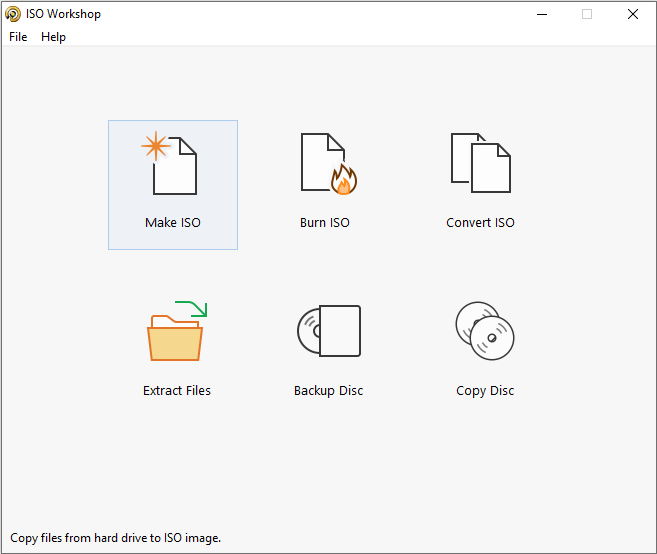
ISO Workshop gives you four basic, easy-to-follow options to choose from

ISO files are basically images of CDs and DVDs. They work as both a backup and distribution medium for CDs and DVDs, and with the right software can even be mounted as virtual discs and accessed as if a physical disc had been burned and inserted into your computer’s DVD drive.

Successive versions of Windows have got better at dealing with ISO images – Windows 7 users can both create ISOs from existing CDs and DVDs, and burn them back to CD or DVD, for example – but if you want more advanced features or are using an older version of Windows, you’ll need third-party software.

ISO Workshop offers four tools: extraction, creation, conversion and burning. Extraction allows you to retrieve files from ISO and other image-based formats (including DMG, CUE and BIN). Click Backup to convert a physical disc into an ISO or CUE file for backup or distribution purposes. Convert is where you can convert from a wide range of other formats to ISO or BIN, while Burn allows you to take an ISO file and burn it back to CD, DVD or Blu-ray disc.

Each tool is pretty simplistic, but easy to grasp. One missing feature is the ability to physically mount an ISO file as if it were a CD – if you want this functionality, add another free tool like Virtual CloneDrive alongside ISO Workshop to get all the functionality you need.

Version 2.6 brings these changes/fixes/features:

-Updated burning SDK and translations.
-Few minor fixes.

Verdict:

Another fuss-free tool from Glorylogic, demonstrating that the best things in life aren’t just free, they’re simple too.

Your Comments & Opinion
 
Related Download Articles
 
Free Easy CD DVD Burner

Free Easy CD DVD Burner 5.1

Freeware

A free yet feature packed CD and DVD burning suite

Hamster Free Burning Studio

Hamster Free Burning Studio 1.0.9.9

Freeware

A free disc burning tool with a cutesy face

InfraRecorder Portable

InfraRecorder Portable 0.52

Open Source

Create audio, data and video discs, images and more with this straightforward disc burning tool

InfraRecorder 0.52

InfraRecorder 0.52

Open Source

Create audio, data and video discs, images and more with this straightforward disc burning tool

Other Download Articles From This Category
DVDStyler v2.2

DVDStyler v2.2

Open Source

Quickly burn professional-looking video DVDs with the minimum of hassle

CDBurnerXP 4.4.1

CDBurnerXP 4.4.1.3099

Freeware

Quickly burn just about any disc from your PC, all for free

Joboshare DVD Creator 3.3.0

Joboshare DVD Creator 3.3.0

Function Limited Demo

Easily create professional video DVDs

BurnAware 4 Professional

BurnAware Professional 4.9

Trial Software

Commercial disc burning tool which can cater for all your CD and DVD creation needs

From Softwarecrew

Please wait while my feed loads

See more posts...

Our Price: $49.99
RRP: $99.99
Saving 50%
Buy Now More Info
Offer Ends In:
 

Spotlight: Free Full Software

Giveaway: WinISO Standard 6.1.0

Free Full Commercial Software

WinISO is a very comprehensive tool which provides everything you need to create, edit and convert disc images.

If you've an image file already, for instance (ISO, CUE/ BIN, NRG, MDF, CCD, IMG and DVD formats are supported) then you can open it in a click or two, browse the image contents, and extract the files you need with a quick drag and drop.

It's just as easy to create new ISO9660, UDF, even HFS+ images. Just choose the option you need, then either manually build up your preferred file and folder structure; drag and drop your files and folders from Explorer onto the program; or create an image directly from a CD, DVD or Blu-ray disc.

Of course you can edit images, too. Is an ISO file too large for your needs, say? Open it up, locate and remove any surplus files to free up a little space.

WinISO program has full support for reading and creating bootable image files. A simple conversion tool makes it easy to convert disc images into the format you need. And the program can even mount ISO files as Explorer files, or burn images to disc when you're ready to save them.

Please note, this trial version of WinISO Standard will not save files greater than 500MB in size.

Giveaway: on Wednesday, we're giving you the full current version of WinISO Standard 6 worth $29.95. The download link here will take you to Downloadcrew Giveaway.

[...]
Time Remaining: