From Twitter

Please wait while my tweets load

If you can't wait - jump to Twitter

See more tweets...

RSS Feed

Please wait while my feed loads

See more posts...

Newsletter

Subscribe to either one of our two newsletters for regular updates and information

Downloads newsletter

This is a weekly newsletter with download news, updates and other information

This is a monthly newsletter with software store information, offers and deals

Google SketchUp 8.0.11752

Create and share accurate 3D models with this powerful modelling application

by Mike Williams

Our Rating:
Your Rating:
Login to rate
Based on 1 ratings
License: Freeware
Operating Systems: Mac OS X, Windows 7 (32 bit), Windows 7 (64 bit), Windows Vista (32 bit), Windows Vista (64 bit), Windows XP
Requirements:


Languages: English
Software Cost: Free
Date Updated: 05 December 2011
Watchlist: Add download to my watchlist
Downloads To Date: 2220
Developer: Google
RSS News Feed: http://sketchupdate.blogspot.com/atom.xml
Buy TuneUp Utilities 2012 for only £10.95, with lifetime license, saving 63% from the RRP, only from store.downloadcrew.co.uk
Google SketchUp 8
Create and share accurate 3D models

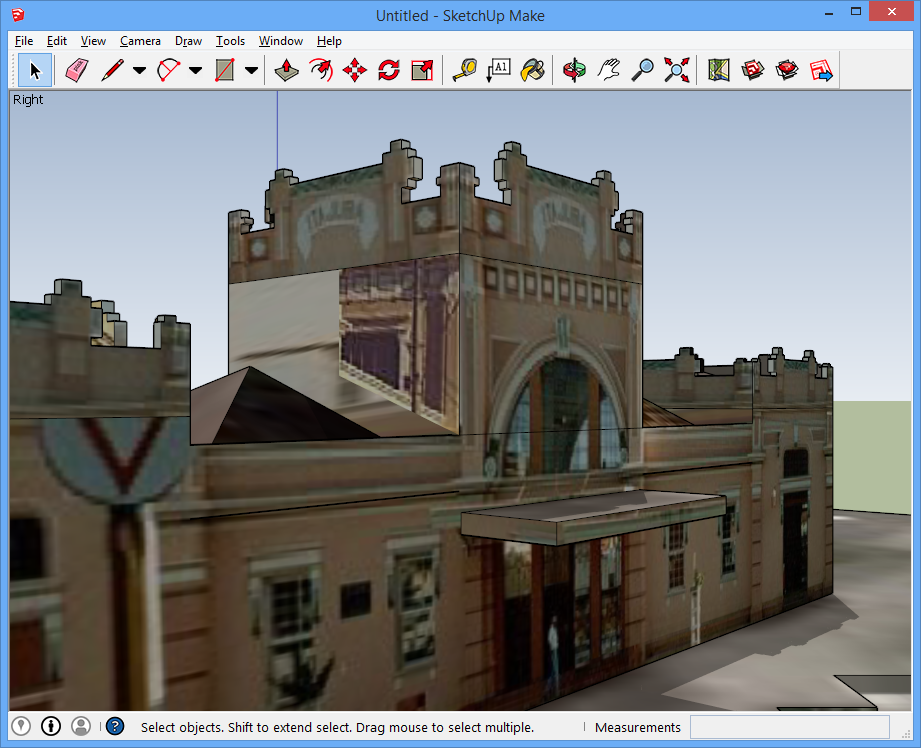
Google SketchUp 8 is an easy-to-use 2D sketching and 3D modelling tool, that makes it easy to create models, share them, use them in Google Earth, and more.

If you've tried 3D tools modelling programs before, and been put off by their complexity, SketchUp will feel very different. Not least because the program allows you to directly import models created by other users.

Click File > 3D Warehouse > Get Models, for instance, and a Google search window opens where you can find interesting models. There are landmarks, like Tower Bridge in London or St Peter's in Rome; more general building types, like police or fire stations; general scenery, such as trees or hedges; and if you're modelling the inside of a room then you'll find tables, chairs, TVs, everything you need to create a realistic environment, all of which can be imported in a few clicks.

Still not enough? SketchUp can import 3D models in the popular 3DS format, and there are thousands of great examples available online, free for the time it takes to download.

If you can't find what you need, though, or you're looking to produce a very precise model, then you can always just start from scratch. And it's far easier than you think, mostly due to SketchUp's Push/ Pull option. If you want to turn a 2D object into a 3D shape, you don't have to browse and learn complicated extrusion options - just click, move your mouse, and you'll make it happen automatically. It still takes a little while to master this new way of thinking, but once you've got it, creating all kinds of 3D models will be no problem at all.

There are plenty of other features on offer, too: accurate dimensioning, attractive colours and texturing for your work, realistic shadowing, with layers to help keep complex models more manageable.

3D walkthroughs then make it easy to move around a model for a closer look. You're able to crate animations, too. And your work can be exported in its 3D form, or as TIFF, JPG or PNG images, for easy viewing by others.

And new features in this release include model geo-location with Google maps, colourful and accurate 3D terrain, the ability to create models by tracing photographs, and the Building Maker, which helps you create 3D buildings from images in Google Earth.

Google SketchUp 8 Pro takes all these features, and adds valuable extras, like the ability to import and export DXF and DWG files; work on 2D vector images in the 2D LayOut program, saving them to PDF or EPS files; and export your models to 3D formats including 3DS, OBJ, XSI, FBX, VRML and DAE. The program costs $495 US and you can find out more at the SketchUp site.

Verdict:

A surprisingly easy-to-use modelling tool which provides instant access to a huge library of pre-built models

Your Comments & Opinion
 
Related Download Articles
 
Ashampoo Home Designer 1.0

Ashampoo Home Designer 1.0

Full Commercial Application

Plan out the look of your next home decoration or renovation project before you spend anything on expensive materials

Google Books Downloader

Google Books Downloader 2.0

Freeware

Save Google books as PDF, JPEG or PNG files

Sculptris

Sculptris 1.02

Freeware

Easily create and paint top quality 3D character models with this beginner-friendly tool

Google Earth for iPhone

Google Earth for iPhone 2.0.1

Freeware

Explore the world in three dimensions from your iPhone

Other Download Articles From This Category
Xara Photo and Graphic Designer MX 8.1

Xara Photo and Graphic Designer MX 8.1

Trial Software

Photo editing, vector drawing, dtp, web graphics, Flash animation - this tool does it all

Xara Designer Pro X 8.1

Xara Designer Pro X 8.1

Trial Software

From photos to illustration, print to web work, Xara Designer Pro X can handle all your creative needs

Adobe Proto

Adobe Proto 1.0

No Trial Available. Purchase Only

Create interactive design prototypes with your iPad

Adobe Illustrator CS6

Adobe Illustrator CS6

Trial Software

Adobe's flagship vector drawing application gains a new look and much-enhanced performance

From Softwarecrew

Please wait while my feed loads

See more posts...

Our Price: $49.99
RRP: $99.99
Saving 50%
Buy Now More Info
Offer Ends In:
 

Spotlight: Free Full Software

Giveaway: WinISO Standard 6.1.0

Free Full Commercial Software

WinISO is a very comprehensive tool which provides everything you need to create, edit and convert disc images.

If you've an image file already, for instance (ISO, CUE/ BIN, NRG, MDF, CCD, IMG and DVD formats are supported) then you can open it in a click or two, browse the image contents, and extract the files you need with a quick drag and drop.

It's just as easy to create new ISO9660, UDF, even HFS+ images. Just choose the option you need, then either manually build up your preferred file and folder structure; drag and drop your files and folders from Explorer onto the program; or create an image directly from a CD, DVD or Blu-ray disc.

Of course you can edit images, too. Is an ISO file too large for your needs, say? Open it up, locate and remove any surplus files to free up a little space.

WinISO program has full support for reading and creating bootable image files. A simple conversion tool makes it easy to convert disc images into the format you need. And the program can even mount ISO files as Explorer files, or burn images to disc when you're ready to save them.

Please note, this trial version of WinISO Standard will not save files greater than 500MB in size.

Giveaway: on Wednesday, we're giving you the full current version of WinISO Standard 6 worth $29.95. The download link here will take you to Downloadcrew Giveaway.

[...]
Time Remaining: