From Twitter

Please wait while my tweets load

If you can't wait - jump to Twitter

See more tweets...

RSS Feed

Please wait while my feed loads

See more posts...

Newsletter

Subscribe to either one of our two newsletters for regular updates and information

Downloads newsletter

This is a weekly newsletter with download news, updates and other information

This is a monthly newsletter with software store information, offers and deals

PrimoPDF 5.1.0.2

Create your own PDF files by converting documents you have created in other programs

by Mark Wilson

Our Rating:
Your Rating:
Login to rate
Based on 0 ratings
License: Freeware
Operating Systems: Windows 2000, Windows 7 (32 bit), Windows 7 (64 bit), Windows Vista (32 bit), Windows Vista (64 bit), Windows XP
Requirements:


Languages: English
Software Cost: Free
Date Updated: 27 July 2010
Watchlist: Add download to my watchlist
Downloads To Date: 763
Developer: Nitro PDF Inc
RSS News Feed: http://feeds.feedburner.com/TheNitroPdfBlog
Twitter Feed: http://twitter.com/nitropdf
Buy TuneUp Utilities 2012 for only £10.95, with lifetime license, saving 63% from the RRP, only from store.downloadcrew.co.uk
PrimoPDF - create your own PDFs for free
Create PDFs from any printable file with PrimoPDF

PDF documents are incredibly useful when it comes to sharing documents with others, particularly online. The nature of the file format means that no matter what platform is used to view a file, it will look identical on any computer. Manual, guides and all manner of other documents are provided as PDFs online, but it has not always been easy to create your own. This is where PrimoPDF can help, making it possible to transform any file which can be printed into a PDF file.

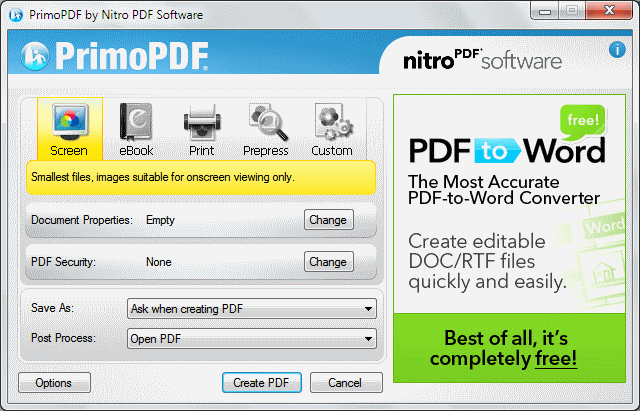
Simply open a document you would like to convert, whether it is an image or a text file, opt to print it and select the PrimoPDF printer. You can then choose from a range of PDF creation options, customising the quality of the resulting file by adjusting image quality and DPI settings. To make the creation process quicker, profiles can be saved to tailor PDFs for particular tasks - such as uploading to the internet or creating an ebook. Files can be automatically saved in a specific folder, and you also have the option of automatically attaching a file to an email or opening it in an appropriate viewer once it has been saved.

Security feature make it possible to password protect PDF so they cannot be opened or edited without the necessary credentials; this means that sensitive information can be included in an online document without fear of it falling into the wrong hands. PrimoPDF is the perfect example of what a utility should be - easy to use, quick to operate and flawless in its execution.

Verdict:

Creating your own PDFs could hardly be easier - PrimoPDF is a wonderful utility that makes document creation simple

Your Comments & Opinion
 
Related Download Articles
 
Foxit Reader Portable

Foxit Reader Portable 5.3.0 rev.2

Free, for personal-use only

Open and read PDF documents more quickly

Nitro Pro 7.3

Nitro Pro 7.3.1.1 [32-bit]

Trial Software

Powerful PDF creation, management and editing application

doPDF 7.3

doPDF 7.3.381

Freeware

Produce a PDF document from just about any Windows application

novaPDF Desktop 7.4.369

novaPDF Lite Desktop 7.5.379

Trial Software

Create universally accessible PDF files from any Windows application.

Other Download Articles From This Category
Producteev 5.1.2

Producteev 1.1.2

Free, for personal-use only

Get your life under control with this powerful task manager for your Android device

Producteev 5.1.2

Producteev 5.1.2

Free, for personal-use only

Get your life under control with this powerful task manager for your iPhone or iPad

Producteev 1.0.1.0

Producteev 1.0.1.0

Free, for personal-use only

Get your life under control with this powerful task manager

CintaNotes

CintaNotes 1.6.2

Freeware

Put your thoughts and notes in order with this freebie organiser 

From Softwarecrew

Please wait while my feed loads

See more posts...

Our Price: $887.93
RRP: $1109.90
Saving 20%
Buy Now More Info
 

Spotlight: Free Full Software

Giveaway: WinISO Standard 6.1.0

Free Full Commercial Software

WinISO is a very comprehensive tool which provides everything you need to create, edit and convert disc images.

If you've an image file already, for instance (ISO, CUE/ BIN, NRG, MDF, CCD, IMG and DVD formats are supported) then you can open it in a click or two, browse the image contents, and extract the files you need with a quick drag and drop.

It's just as easy to create new ISO9660, UDF, even HFS+ images. Just choose the option you need, then either manually build up your preferred file and folder structure; drag and drop your files and folders from Explorer onto the program; or create an image directly from a CD, DVD or Blu-ray disc.

Of course you can edit images, too. Is an ISO file too large for your needs, say? Open it up, locate and remove any surplus files to free up a little space.

WinISO program has full support for reading and creating bootable image files. A simple conversion tool makes it easy to convert disc images into the format you need. And the program can even mount ISO files as Explorer files, or burn images to disc when you're ready to save them.

Please note, this trial version of WinISO Standard will not save files greater than 500MB in size.

Giveaway: on Wednesday, we're giving you the full current version of WinISO Standard 6 worth $29.95. The download link here will take you to Downloadcrew Giveaway.

[...]
Time Remaining: